


Aussie Security Tech Develops CCTV Installer Tool Called Nebula Field To Make CCTV Camera Selection Easier.
Aussie Security Tech Develops CCTV Installer Tool – Australian electronic security technician Steven Hunter is developed Nebula Field, a Windows desktop application designed to reduce the time technicians spend identifying devices, testing networks and producing commissioning documentation on security installations.
Hunter, founder and developer of Nebula Field, says the software grew out of problems he encountered while working on CCTV and other electronic security systems. Rather than relying on separate manufacturer applications and manual records, Nebula Field brings network discovery, device identification, camera access, testing, evidence capture, change control and commissioning reports into a single technician workflow.
“Anyone who has commissioned CCTV systems knows the challenges,” Hunter says. “Cameras on different subnets, unknown IP addresses, multiple manufacturers, limited network access and the need to document everything accurately before handing a system over to the customer.“
The software, which is currently going into wider beta testing, begins with a job and site profile that records the customer, site, technician, authorisation, network CIDR, VLAN, gateway, DHCP range and reserved addresses. This establishes the network scope before discovery starts and provides a reference for subsequent commissioning work.
Network discovery can scan IP addresses and subnets and build an inventory of observed devices. In the demonstration environment, the inventory identifies cameras from Axis, Hikvision, Dahua, Hanwha and Uniview, along with Gallagher access control, a Bosch alarm panel and a Jacques intercom. The software records available information including IP address, MAC address, manufacturer, model, device type and open TCP ports, while distinguishing between confirmed identification and information inferred from network or web-page data.
The system also identifies address conflicts. In the demonstration images, 2 devices are shown sharing an address, with the conflict watch identifying the loading dock and warehouse aisle devices. Address planning displays observed, conflicting, reserved and candidate addresses, giving the technician a way to assess the problem before making a change.
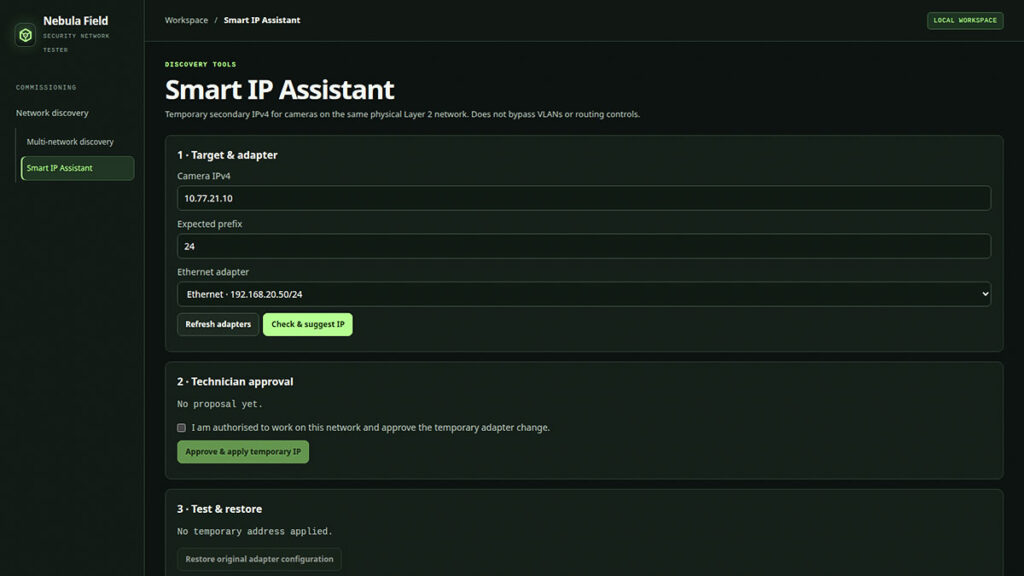
Nebula Field can also assist where a camera is on a different IP range from the technician’s workstation. Its Smart IP Assistant can temporarily add an IPv4 address to an authorised network adapter after technician approval, allowing a camera on the same physical Layer 2 network to be accessed without bypassing VLAN or routing controls. The application records the change and provides a restore function.
“Rather than approaching the problem purely from a software development perspective, I’m designing Nebula around situations technicians encounter on real sites, including the difficult and unpredictable ones,” Hunter says.
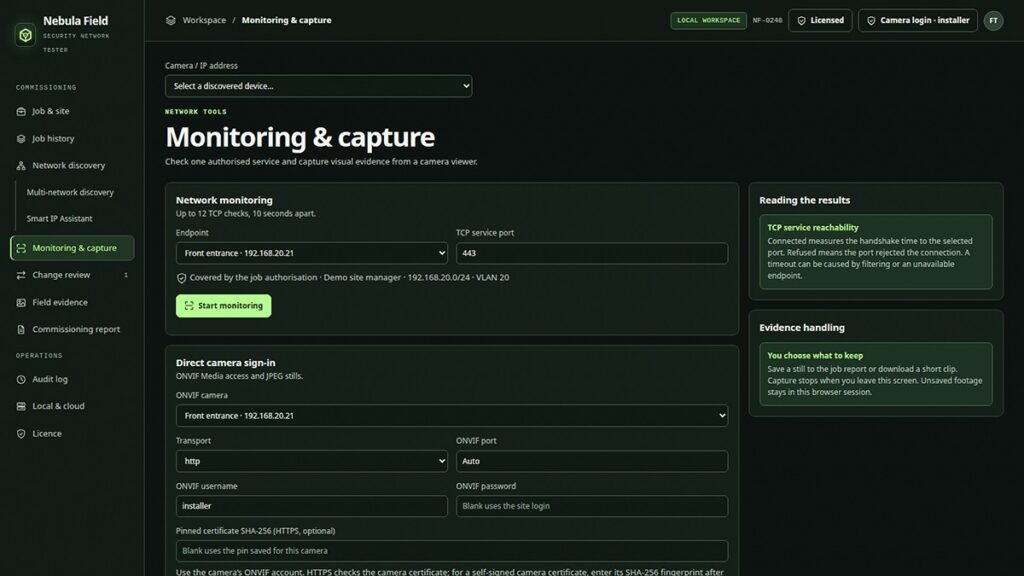
Camera testing is handled through manufacturer-independent interfaces where possible. The monitoring and capture functions can test TCP service reachability and provide direct camera sign-in through ONVIF, with JPEG snapshots available from the camera viewer. The camera management screen also supports read-only VAPIX access for Axis devices and can provide snapshots and live H.264 video through the appropriate camera interface.
The emphasis is on verification rather than simply discovering an IP address. A technician can confirm the identity of a device, test connectivity, view a camera and capture evidence as part of the commissioning process. Field evidence can be attached to a particular device or site, with notes and captured images recorded against the job.
Change management is similarly structured. Proposed IP changes are placed into a queue and require approval before application. The demonstration workflow separates proposal, approval, application, validation and rollback, with the technician responsible for the actual change on site. This creates a record of what was proposed and what was subsequently done.
The audit log records commissioning activity in timestamp order, including network scans, device sign-in, connection checks, proposed IP changes and field evidence. This gives the installer a record of the work rather than relying on separate notes or manually reconstructed commissioning information.
At the end of the process, Nebula Field can generate a commissioning report from the recorded information. The demonstration report includes the site and network details, endpoint register, discovered devices, connection checks, changes and validation, field evidence and open items requiring attention. It also identifies information that remains unconfirmed, rather than simply presenting the installation as complete.
Hunter says this distinction is important to the way he is developing the software.
"The goal is to create a single, manufacturer-independent toolkit for electronic security technicians," he says.
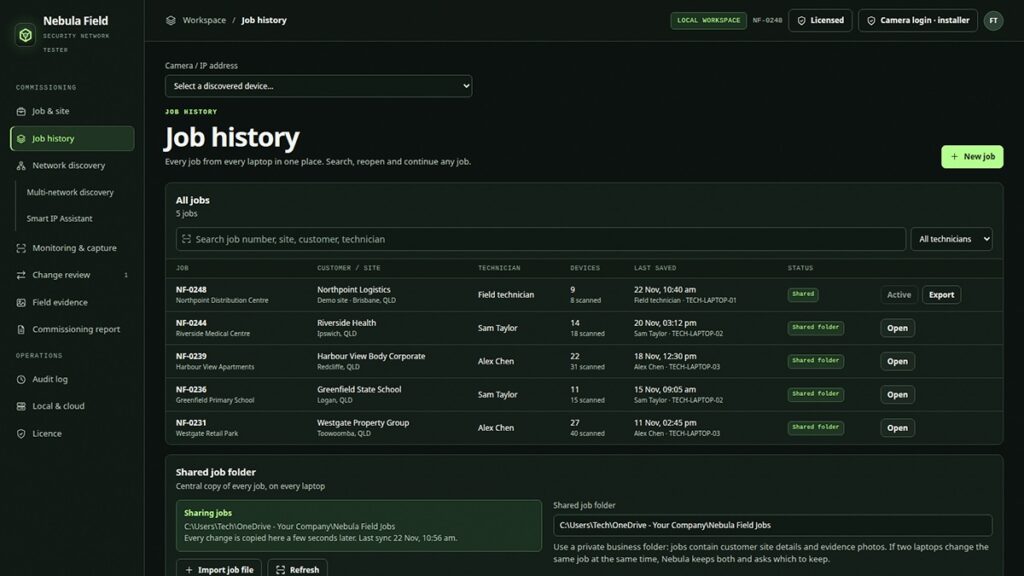
The application is also designed to operate offline, which is relevant to isolated security networks and sites where internet access is unavailable or deliberately restricted. Its local workstation function stores jobs and evidence in the browser profile, while a shared job folder can be used to maintain a central copy of jobs across technicians' laptops. The demonstration also shows job history containing multiple sites and technicians, with jobs available for reopening and continuation.
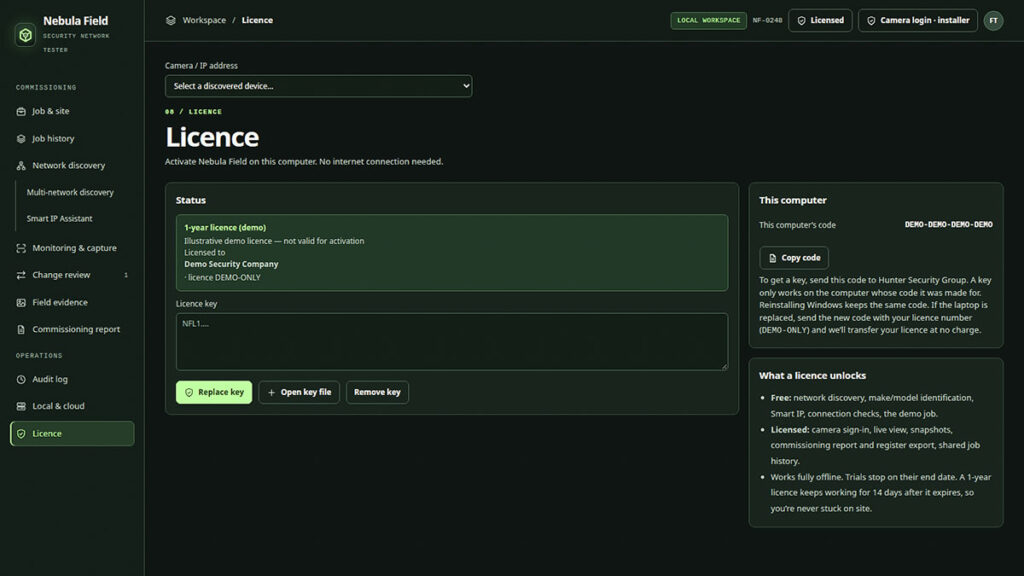
Licensing is handled locally rather than requiring a permanent internet connection. The demonstration licence screen describes a 1-year licence and states that the application continues working offline, with a 14-day period after licence expiry.
Nebula Field is currently being developed as a Windows desktop application - Hunter says he is working towards wider beta testing, with the intention of keeping the core software affordable for independent technicians and smaller security businesses.
"I'm building it while actively working as a security technician – that’s what makes this project different," Hunter says.
You can contact Nebula Field developers via techone0101@gmail.com to learn more about the solution and beta testing, or read more SEN news here.
Nebula Field Features
“Aussie Security Tech Develops CCTV Installer Tool Called Nebula Field To Make CCTV Camera Selection Easier.”