



-

- Advertisment -
  • HID TREND REPORT
  • AcuSeek
  • ASSA ABLOY Aperio IL100 – design-driven wireless access reader. Register your interest.

Synology Patches Critical DSM Flaws

Synology Patches Critical DSM Flaws Affecting NAS Units Used For CCTV Recording And Storage.

Synology Patches Critical DSM Flaws – Synology has released an update for its DiskStation Manager (DSM) operating system that fixes 8 vulnerabilities. Two are rated a critical CVSS 9.8, and unauthenticated remote attackers can exploit both to read or write arbitrary files and cause denial of service.

Plenty of Australian video surveillance systems record to Synology NAS units running Surveillance Station, and many more use them to archive footage from other VMS platforms. If you’ve installed or maintain any of them, this update belongs on this month’s to-do list – the advisory lists no workaround, only the patch.

SYNOLOGY has carved out a solid place in the security market over the years. Its NAS units run Surveillance Station at countless small and mid-sized sites, its DVA deep-learning recorders sit in comms rooms around the country, and plenty of integrators use DiskStations as cheap, capable archive storage behind their VMS of choice. All of that runs on DSM, which is why advisory Synology-SA-26:13 deserves attention from security installers, not just IT teams.

Synology published the advisory on September 18 and rated it Critical. The 2 serious flaws are:

Synology SA-26:13 at a glanceEight DSM vulnerabilities, two of them critical
Published 18 Sep 2026 · Rated CriticalCVSS base scores out of 10
The two serious flaws
CVE
Issue
CVSS
CVE-2026-13684
Improper output encoding in DSM’s SCGI componentRemote, no credentials. Read or write arbitrary files, or crash the NAS.
9.8
CVE-2026-13639
Insufficient entropy in DSM’s login logicRemote, no credentials. Read or write arbitrary files, or crash the NAS.
9.8
The other six
CVE
Issue
CVSS
CVE-2026-13673
LDAP API permissions flawAuthenticated user can read or write arbitrary files.
8.8
CVE-2026-6205
Upload API path flawAuthenticated user can write arbitrary files.
8.1
Plus four lower-rated issues, from moderate down to low.
Fixed versions (or later)
DSM 7.4-900757.4 branchDSM 7.3.2-86009-47.3 branchDSM 7.2.2-72806-97.2.2 branchDSM 7.2.1-69057-127.2.1 branch
No mitigation listed. Synology offers no workaround for these flaws; updating DSM is the fix.
Source. CVE identifiers, scores, components and fixed versions from Synology advisory SA-26:13, as reported by SEN. Fixes are listed for DSM 7.2.1 and later only.
Synology Patches Critical DSM Flaws
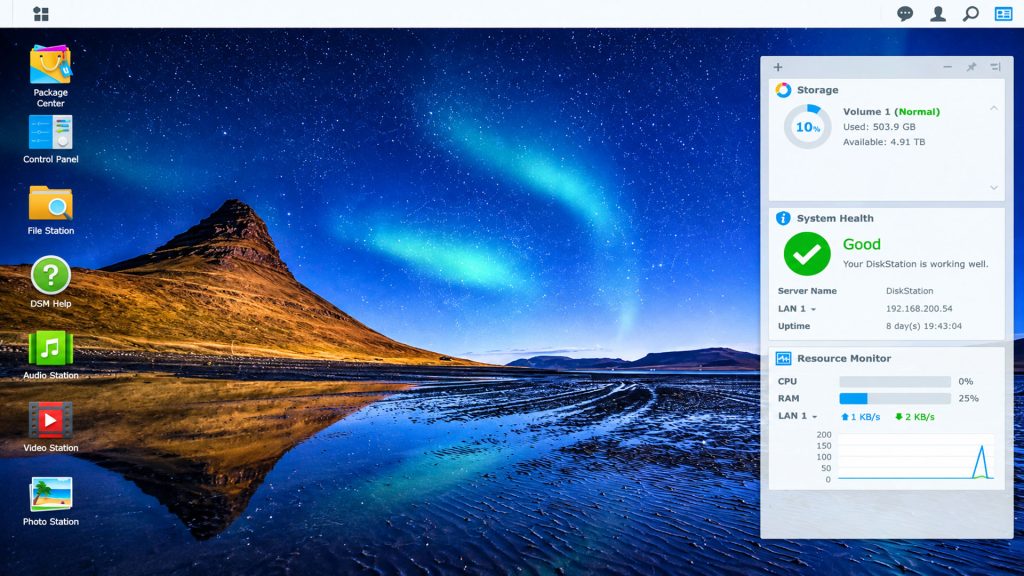
Synology NAS running DSM – critical vulnerabilities SA-26:13 – Synology Patches Critical DSM Flaws

Why This Matters For CCTV

Think about what sits on a recording NAS. It holds weeks or months of footage, and sometimes footage that’s been exported as evidence. It holds the camera credentials Surveillance Station uses to pull streams, and often network shares used by the rest of the business. A flaw that lets a remote attacker write arbitrary files to that box is about as bad as it gets for system integrity – and the integrity of recorded video is exactly what end users and police rely on when something goes wrong.

Singapore’s Cyber Security Agency issued its own alert on September 23, advising users and administrators to update immediately. At the time of writing we haven’t seen reports of these flaws being exploited in the wild. Having said this, NAS units exposed to the internet have long been a favourite target – ransomware campaigns such as eCh0raix have hit internet-facing NAS boxes before – and the gap between a published patch and working attacks keeps getting shorter.

What Should Installers Do?

The first job is simple: log in to every Synology unit you look after and check the DSM version against the list above. Don’t assume auto-update has done the job – many recording NAS units have it switched off precisely so a firmware update doesn’t interrupt recording overnight. Schedule the update, let it reboot, then check every camera is back and recording.
Synology Patches Critical DSM Flaws
Synology Patches Critical DSM Flaws 4
How to checkFinding your DSM version, and reading it against the advisory
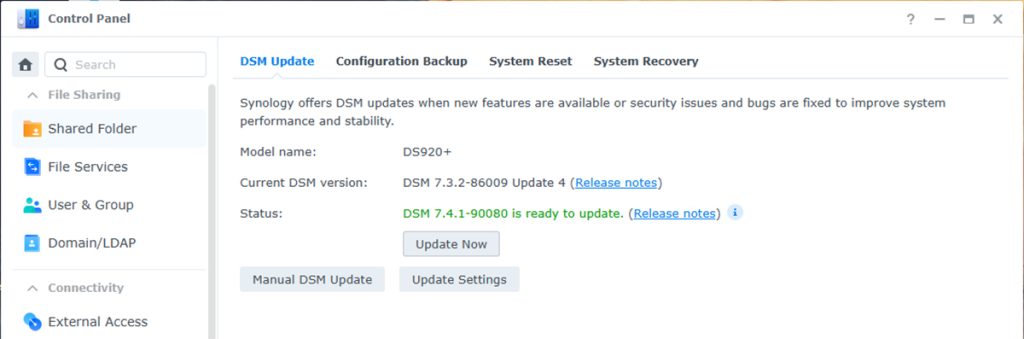
Four clicks per unit. The catch is the “Update N” suffix, which the advisory writes as “-N”.
1
Open Control PanelSign in to DSM as an administrator and open Control Panel.
2
Go to Update & RestoreUnder System, choose Update & Restore. The DSM Update tab opens first.
3
Read the Current DSM version lineNote the model name too; fixes vary by branch, and models that cannot run DSM 7.2.1 have no fix listed.
4
Update, or check why it has notUpdate Now if a patched build is offered. Use Update Settings to see whether auto-update is off, and Manual DSM Update for units with no internet access.
Reading the version string
DSM 7.3.2-86009 Update 4What DSM shows on the DSM Update tab
=
DSM 7.3.2-86009-4How Synology writes it in SA-26:13
Example: a DS920+ showing 7.3.2-86009 Update 4 is already on the fixed build for the 7.3 branch. Anything at or above the listed version for your branch includes the fix; a later release such as 7.4.1 does too.
Source. Menu path from DSM 7 Control Panel; version mapping from Synology advisory SA-26:13, which lists DSM 7.4-90075, 7.3.2-86009-4, 7.2.2-72806-9 and 7.2.1-69057-12 or later as fixed. Screenshot example as reported by SEN.

Something to note is that the advisory only lists fixes for DSM 7.2.1 and later. If you’ve still got older DiskStations quietly recording cameras in a back room somewhere, it’s worth checking where they sit with Synology’s support lifecycle – and having a conversation with the customer about replacement.

The second job is the one that actually reduces risk over time. We’d keep DSM’s management interface off the open internet – no port forwards to ports 5000 and 5001, and remote access via VPN or Synology’s own relay services instead. We’d put recording NAS units on a separate camera VLAN, away from office PCs. And we’d make sure footage that matters is backed up somewhere an attacker on the NAS can’t reach.

Installer checklistTwo jobs: patch every unit now, then take it off the internet
Tick these off per site. The boxes are for working through the list on the job; nothing is saved.
1Patch nowToday
2Reduce exposureThis month
Context: no in-the-wild exploitation had been reported at the time of writing, but internet-facing NAS units are a long-standing target (eCh0raix ransomware, for one) and the gap between a published patch and a working attack keeps shrinking.
Source. Steps are SEN’s recommendations from this article. Port numbers are DSM’s default HTTP and HTTPS management ports. The advisory lists fixes for DSM 7.2.1 and later only.

SEN’s View

In fairness to Synology, it published a clear advisory with fixed versions across 4 DSM branches at once, and that’s how it should be done.

The bigger issue, in our opinion, is the same one we raised with Ubiquiti’s recent bulletin. Recording NAS units tend to be installed, tuned and forgotten. They’re often owned by nobody in particular – too “IT” for the security contractor and too “security” for the IT provider. When the device holding a site’s video evidence has a 9.8 vulnerability, that grey zone needs closing, and the security installer is often best placed to close it.

You can read Synology’s security advisory SA-26:13 here or read more SEN news here.

18 Sep 2026
Synology publishes SA-26:13, rated Critical
23 Sep 2026
Singapore’s Cyber Security Agency: update immediately
Now
No exploitation reported yet; no mitigation, so patch
Who owns the recording NAS at your sites? If nobody, it’s you
Recording NAS units get installed, tuned and forgotten, too “IT” for the security contractor and too “security” for the IT provider. Read the advisory, check your DSM versions against it, and close that gap before someone else finds it.
Synology opens in a new tab. Exploitation status as at the time SEN published; check the advisory for updates.

FEATURES: Synology-SA-26:13 At A Glance

  • 8 vulnerabilities fixed in DSM
  • 2 rated critical CVSS 9.8, exploitable remotely without authentication
  • Arbitrary file read/write and denial of service
  • Fixed in DSM 7.4-90075, 7.3.2-86009-4, 7.2.2-72806-9 and 7.2.1-69057-12
  • No mitigation – update required
Synology Patches Critical DSM Flaws
Synology Patches Critical DSM Flaws 5
”
Join the conversation
What’s your read on this?
SEN readers are the people doing the work — installers, integrators, engineers, specifiers and end users. If you’ve got hands-on experience, a correction, or a view worth arguing, put it below.
ModeratedReal names welcomeNo sales pitches

LEAVE A REPLY

Please enter your comment!
Please enter your name here

SEN News
SEN Newshttps://sen.news
Security & Electronics Networks - Leading the Security Industry with News and Latest Events. Providing information and pre-release updates on the latest tech and bringing it all to you daily. SEN News has been in print for over 20 years and has grown strong as a worldwide resource in digital media.
ASSA ABBLOY
SAGE 2026

Latest news

Insignia Financial Standardises Access With Protege GX

Insignia Financial Standardises Access With Protege GX Across National Footprint.Insignia Financial Standardises Access With Protege GX - When Insignia...

ABLOY CUMULUS Expands Keyless Access To Doors

ABLOY CUMULUS Expands Keyless Access To Doors, As Well As Padlocks And Key Safes.ABLOY CUMULUS Expands Keyless Access To...

Gallagher Security appoints Brad Sheen Enterprise And Consultant Manager

Gallagher Security appoints Brad Sheen Enterprise And Consultant Manager For New South Wales And ACT.Gallagher Security appoints Brad Sheen...
- Advertisement -
ASSA ABBLOY

City Of Perth Seeks New CCTV Tower Units

City Of Perth Seeks New CCTV Tower Units With Potential Upgrades To Existing Towers And Trailers.City Of Perth Seeks...

WatchGuardian Health From Connectified Monitors Health Data

WatchGuardian Health From Connectified Monitors Health Data From Samsung Galaxy Wearables.WatchGuardian Health From Connectified Monitors Health Data - Connectified...

ASIS ACT SAGE Seminars Announced

ASIS ACT SAGE Seminars Announced And Cover Protective Security, Risk, Facilities And Australia's Security Environment.ASIS ACT SAGE Seminars Announced...

Must read

Security Systems Sought For Acacia Prison

Security Systems Sought For Acacia Prison Expansion At Wooroloo...

Wire Size Considerations In Large Security Applications

Wire Size Considerations In Large Security Applications Must Take...

Building Trusted Access For Next-Gen Data Centres

Building Trusted Access For Next-Gen Data Centres Critical To...

See Jack Fuse Safety Call Point Range At SAGE 2026

See Jack Fuse Safety Call Point Range At SAGE...
- Advertisement -

ASIS ACT SAGE Seminars Announced

ASIS ACT SAGE Seminars Announced And Cover Protective Security, Risk, Facilities And Australia's Security Environment.ASIS ACT SAGE Seminars Announced...

Gallagher Security Queensland Forum Brings Industry Together

Gallagher Security Queensland Forum Brings Industry Together Across Queensland And Papua New Guinea.Gallagher Security Queensland Forum Brings Industry Together...

Acecom Installing Avigilon, Integriti At NT Art Gallery

Acecom Installing Avigilon, Integriti At NT Art Gallery In Darwin.Acecom Installing Avigilon, Integriti At NT Art Gallery - Acecom...

Ubiquiti Patches 3 Maximum Severity UniFi Flaws

Ubiquiti Patches 3 Maximum Severity UniFi Flaws In Protect, UniFi OS And Talk, With Around 3200 Australian Consoles Exposed.Ubiquiti...

City of Parramatta Seeks Integrated Security Services

City of Parramatta Seeks Integrated Security Services Across Its Local Government Area.City of Parramatta Seeks Integrated Security Services -...

Dicker DAS Signs Up For SecTech Australia And SecTech NZ 2027

Dicker DAS Signs Up For SecTech Australia And SecTech NZ 2027 And Will Tour 8 Cities Across ANZ Next...
- Advertisement -
The people who specify, install and sign off security read SEN.Display, newsletter and sponsored content across Australia’s security industry.19,000+Monthly readers37,000+Page views200,000+Ad impressionsSee rates & specs →Google Analytics 4 · July 2026

You might also likeRELATED
Recommended to you